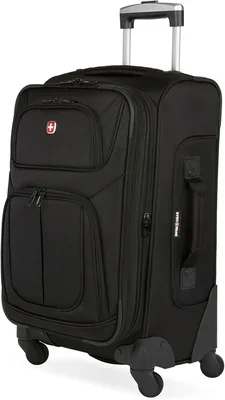
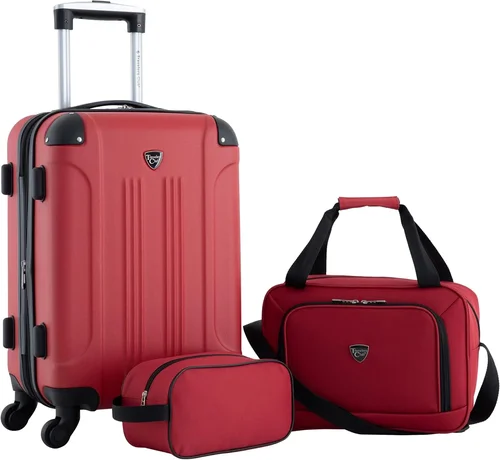
Travel has evolved, and so has the gear we carry. Expandable smart luggage sits at the intersection of convenience, technology, and style, offering travelers a way to pack more without sacrificing mobility or security. Whether you’re a frequent flyer, a weekend road‑tripper, or a digital nomad, the right piece of smart luggage can turn a stressful airport dash into a smooth, organized experience. This guide walks you through every critical decision point — from battery regulations to expansion mechanisms — so you can invest confidently in a suitcase that grows with your journey.
In the next sections you’ll learn the essential factors that separate a gimmick from a genuine travel companion, the different categories of expandable smart luggage on the market, common pitfalls that cost buyers money, and a clear budget framework that matches features to price. We’ll also share insider tips on timing your purchase, spotting real deals, and making the most of warranties. By the end, you’ll have a personalized checklist that lets you walk into any store or click “Add to Cart” with total clarity.
The market for smart luggage has exploded in the last five years, with major brands like Away, Samsonite, and newer tech‑focused startups all vying for space in overhead bins. Features such as built‑in GPS tracking, USB‑C charging ports, removable power banks, and biometric locks are now standard on many models. At the same time, airlines have tightened rules around lithium‑ion batteries, making removable power modules a must‑have. Understanding these trends will help you filter the noise and focus on the specs that truly matter for your travel style.

What to Look for When Buying Buying Guide
1. Battery Compliance and Removability
Airline regulations are the single biggest technical constraint for smart luggage. Most carriers require that any lithium‑ion battery be removable and carried in the cabin, not checked. Look for a suitcase that houses its power bank in a dedicated, easily accessible compartment — often a zippered pocket on the exterior or a slide‑out tray. The battery capacity should be clearly labeled in watt‑hours (Wh); anything under 100 Wh is universally accepted, while 100‑160 Wh may need airline approval. A removable design also lets you upgrade to a higher‑capacity pack later without buying a new bag.
2. Expansion Mechanism and Capacity Gain
Expandable luggage typically adds 15‑30 % extra volume via a zippered gusset or a flexible fabric panel. The best designs use a reinforced, water‑resistant zipper that runs the full perimeter of the case, preventing the “bulge” that can jam overhead bins. Check the expanded dimensions against the airline’s maximum carry‑on size (usually 22 × 14 × 9 in for U.S. domestic flights). A well‑engineered expansion should keep the case’s center of gravity low, so the bag remains stable on its wheels even when fully packed.
3. Build Materials and Durability
Hard‑shell cases made from polycarbonate or a polycarbonate‑ABS blend dominate the premium segment because they resist cracking and absorb impact. Soft‑shell models often use ballistic nylon (1680D or higher) with a water‑repellent coating. Look for reinforced corners, double‑stitched seams, and a frame that integrates the telescopic handle without creating weak points. A quality suitcase should survive at least 50 drop tests from 3 feet onto concrete without structural failure.
4. Smart Features: GPS, Locks, and Connectivity
Integrated GPS trackers (often using Bluetooth Low Energy or cellular‑assisted location) let you locate your bag via a smartphone app. Biometric or TSA‑approved combination locks add security without the hassle of keys. Some models offer proximity alerts — your phone buzzes if the bag moves more than a set distance away. Evaluate whether the companion app receives regular updates and supports both iOS and Android. A feature‑rich app that drains your phone battery or crashes frequently defeats the purpose.
5. Wheel System and Maneuverability
Four 360‑degree spinner wheels are now the gold standard. Premium wheels use sealed ball bearings and a polyurethane tread that rolls silently on tile, carpet, and cobblestones. Test the wheel housing for wobble; a well‑aligned axle should spin freely with a light push. If you frequently navigate curbs or uneven pavement, consider larger diameter wheels (3.5 in or more) and a suspension‑style mounting that absorbs shock.
6. Handle Ergonomics and Weight Distribution
The telescopic handle should lock at multiple heights (typically three) and feature a comfortable grip — rubberized or contoured plastic. A handle that extends too far forward shifts weight onto your wrist; a well‑balanced design keeps the center of mass over the wheels. Also, check the top and side carry handles: they should be padded and rated for the bag’s maximum load (often 50 lb for carry‑ons).
7. Interior Organization and Accessibility
Smart luggage shines when the interior matches the tech. Look for a clamshell opening with a full‑length zipper, compression straps, a padded laptop sleeve (15‑inch compatible), and multiple mesh pockets for cables, toiletries, and documents. Some models include a removable packing cube system that snaps into built‑in loops, letting you separate clean and dirty clothes without extra bags.
8. Warranty, Support, and Repairability
A lifetime limited warranty on the shell and a 2‑year warranty on electronics is a strong indicator of brand confidence. Verify that the manufacturer offers replacement parts — wheels, handles, zipper pulls — and that service centers exist in your region. Brands that provide a “repair‑by‑mail” program or a network of authorized repair shops extend the usable life of your investment significantly.
Different Types of Buying Guide

Common Buying Mistakes to Avoid
❌ Mistake: Ignoring Airline Battery Rules
Why it’s bad: A non‑removable battery forces you to check the bag or surrender it at security, defeating the purpose of a carry‑on.
What to do instead: Choose a model with a clearly labeled, slide‑out power bank under 100 Wh. Keep the spec sheet handy for TSA.
❌ Mistake: Prioritizing Gadgets Over Build Quality
Why it’s bad: A flashy GPS tracker is useless if the zipper fails after two trips.
What to do instead: Verify material specs (polycarbonate thickness, denier count) and read long‑term durability reviews before buying.
❌ Mistake: Overlooking Expanded Dimensions
Why it’s bad: An expanded bag may exceed overhead‑bin limits, forcing a gate check.
What to do instead: Measure the expanded size yourself or trust manufacturer specs that list both collapsed and expanded dimensions.
❌ Mistake: Skipping Warranty Registration
Why it’s bad: Many brands require online registration within 30 days to activate the full warranty.
What to do instead: Register immediately after purchase; store the confirmation email with your travel documents.
❌ Mistake: Buying the First “Sale” Price Without Comparison
Why it’s bad: Retailers often inflate MSRP to make discounts look larger.
What to do instead: Use price‑history tools (CamelCamelCamel, Keepa) and compare at least three authorized sellers.
❌ Mistake: Neglecting Wheel and Handle Testing
Why it’s bad: A wobbly wheel or sticky handle turns a smooth airport walk into a wrestling match.
What to do instead: In‑store, roll the bag on tile and carpet; extend the handle fully and feel for play.
❌ Mistake: Assuming All Smart Apps Are Equal
Why it’s bad: An app that crashes or lacks background tracking renders GPS useless.
What to do instead: Download the companion app before purchase (many are free) and test pairing with a demo unit or read recent app‑store reviews.
Budget Guidelines: How Much Should You Spend?
Entry‑Level ($120 – $180)
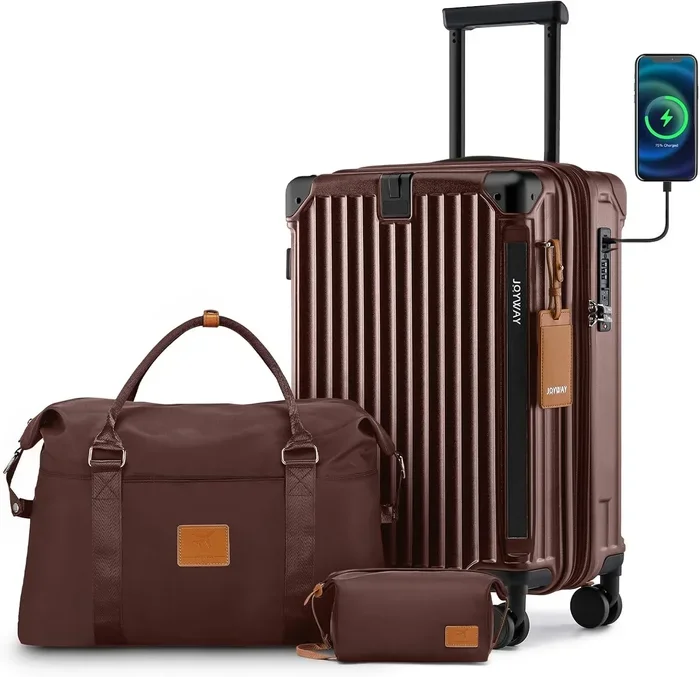
At this tier you’ll find basic smart carry‑ons with a built‑in USB‑A port powered by a removable 10,000 mAh power bank. The shell is usually ABS or a thin polycarbonate blend, wheels are standard 2‑inch spinners, and expansion adds roughly 15 % volume. GPS, biometric locks, and premium interior organization are absent. These bags suit occasional travelers who need a charger on the go and don’t mind a slightly heavier, less durable case.
Mid‑Range ($200 – $380)
This is the sweet spot for most frequent flyers. Expect a polycarbonate or ballistic‑nylon shell, 360‑degree spinner wheels with sealed bearings, a 15‑inch laptop sleeve, and a removable 100 Wh power bank. Expansion typically yields 20‑25 % extra space. Smart features include Bluetooth GPS tracking, TSA‑approved combination lock, and a companion app with proximity alerts. Warranty usually covers the shell for life and electronics for two years.
Premium ($400 – $650)
Premium models add an aluminum or magnesium frame, larger 3.5‑inch suspension wheels, and a modular interior system (removable packing cubes, wet/dry compartments). Battery capacity often reaches 150 Wh with airline‑approved documentation. GPS may use cellular‑assisted location for global tracking without phone proximity. Locks can be fingerprint‑activated. Brands in this tier offer dedicated repair centers and a 5‑year electronics warranty.
Luxury ($700 +)
Luxury smart luggage blends bespoke materials — carbon‑fiber shells, leather accents, hand‑stitched handles — with cutting‑edge tech: solar‑charging panels, AI‑driven packing suggestions via app, and integrated scale that displays weight on the handle. These pieces are often limited‑edition collaborations with designers. While the tech is top‑tier, the price premium is largely for aesthetics and brand prestige. Consider only if you value status as much as function.
Expert Tips for Getting the Best Deal
- Buy During Shoulder Seasons: Late January and September see clearance of previous‑year models before new collections launch.
- Leverage Authorized Retailer Promotions: Brands like Away and Samsonite run “Friends & Family” events with 15‑20 % off plus free monogramming.
- Check Refurbished Programs: Manufacturer‑certified refurbished units carry full warranty and can save 30‑40 %.
- Bundle with Travel Accessories: Some retailers discount a packing‑cube set or a portable luggage scale when purchased together.
- Read Return Policies Carefully: A 30‑day no‑questions return lets you test the bag on a real trip; avoid final‑sale items.
- Test In‑Store Before Online Purchase: Even if you buy online, visit a store to feel the handle, wheels, and expansion zipper.
- Monitor Battery Recalls: Register your bag’s serial number; manufacturers occasionally issue firmware updates or battery replacements.
- Use Credit‑Card Purchase Protection: Many premium cards extend warranty an extra year and cover theft or damage during travel.

Frequently Asked Questions
Q: Can I take expandable smart luggage as a carry‑on on all airlines?
A: Most U.S. domestic carriers allow a carry‑on up to 22 × 14 × 9 in (including wheels and handles). International airlines often have stricter limits (e.g., 21.5 × 15.5 × 9 in). Always measure your bag in its collapsed state and verify the airline’s policy before you fly. If you plan to expand mid‑trip, ensure the expanded dimensions still fit the overhead bin of your return flight.
Q: How do I know if the power bank is airline‑compliant?
A: Look for the watt‑hour (Wh) rating printed on the battery. Under 100 Wh is universally accepted in carry‑on. Between 100‑160 Wh requires airline approval; over 160 Wh is prohibited. The battery must be removable. Keep the manufacturer’s spec sheet or a photo of the label in your carry‑on for security checks.
Q: Does the GPS tracker work without my phone nearby?
A: Bluetooth‑only trackers need your phone within ~30 ft. Cellular‑assisted or LPWAN (Low‑Power Wide‑Area Network) trackers report location to the cloud independently, so you can see the bag’s last known position anywhere with coverage. Check the product specs for “global tracking” or “cellular” to confirm.
Q: Are smart locks TSA‑approved?
A: Most smart luggage uses a TSA‑approved combination lock (the red diamond symbol). Biometric locks often include a mechanical backup that TSA can open with a master key. Verify the lock bears the TSA logo; otherwise, agents may cut it off.
Q: Can I replace the wheels myself?
A: Many mid‑range and premium models use standard 3‑inch or 3.5‑inch spinner wheel assemblies that unscrew with a hex key. Entry‑level bags sometimes have riveted wheels that require professional repair. Check the manufacturer’s parts diagram before buying if self‑service matters to you.
Q: What happens if the battery dies while traveling?
A: The bag still functions as a regular suitcase — wheels, handle, and locks work without power. You simply lose charging, GPS, and smart‑lock features until you recharge the power bank via a wall outlet or USB‑C PD charger.
Q: Is it worth paying extra for a solar‑charging panel?
A: Solar panels on luggage are typically 2‑3 W, enough to trickle‑charge a phone in direct sunlight over several hours. They add weight and cost. If you spend long days outdoors (camping, trekking) they can be handy; for airport‑centric travel they rarely justify the premium.
Q: How do I clean and maintain the exterior?
A: Hard‑shell polycarbonate wipes clean with a damp microfiber cloth and mild soap. Soft‑shell ballistic nylon benefits from a fabric‑guard spray every few months. Lubricate wheel bearings annually with a drop of silicone spray. Store the bag upright, unexpanded, to preserve frame shape.
Q: Can I use the USB port to charge a laptop?
A: Most built‑in USB‑A ports deliver 5 V/2.4 A (12 W) — enough for phones and tablets but not for most laptops, which need 45‑65 W via USB‑C PD. Some premium models include a USB‑C PD port (up to 60 W) that can charge a MacBook Air or similar ultraportable. Check the spec sheet for “Power Delivery” rating.
Q: What should I do if the smart app stops receiving updates?
A: First, ensure your phone OS is current. If the app hasn’t been updated in >12 months, the manufacturer may have abandoned support. In that case, GPS and lock features may still work locally, but cloud services (remote lock, location history) could cease. Consider brands with a track record of multi‑year app support.
Our Final Recommendations
- Best for Budget‑Conscious Buyers: TravelPro Maxlite 5 Smart Carry‑On — $150. Lightweight ABS shell, removable 10,000 mAh power bank, basic USB‑A port, 15 % expansion. No GPS, but solid wheels and a 5‑year shell warranty.
- Best Overall Value: Away The Bigger Carry‑On with Pocket — $295. Polycarbonate shell, 100 Wh removable battery, USB‑C PD 18 W, 360‑degree Hinomoto wheels, lifetime shell warranty, and a well‑rated app with Bluetooth tracking.
- Best Premium Option: Samsonite Omni PC Hardside Spinner with Smart Sleeve — $475. Polycarbonate‑ABS hybrid, 150 Wh removable battery, USB‑C PD 60 W, fingerprint lock, cellular‑assisted GPS, 5‑year electronics warranty, and authorized repair network.
- Best for Beginners: Raden A22 Carry‑On — $225. Simple one‑button lock, integrated 7,800 mAh power bank, USB‑A port, lightweight polycarbonate, and an intuitive app that requires no setup beyond pairing.
- Best for Advanced Users: Bluesmart Two Check‑In — $650. 28‑inch expandable, 200 Wh swappable battery, solar panel, AI packing list, cellular GPS, fingerprint + TSA lock, and a modular interior with RFID‑blocking pockets.
Conclusion: Making the Right Choice
Choosing expandable smart luggage is about matching technology to your travel rhythm. Start with the non‑negotiables — airline‑compliant removable battery, durable shell, and smooth spinner wheels — then layer on the smart features that genuinely simplify your routine: GPS for peace of mind, a fast USB‑C port for on‑the‑go charging, and an app that stays reliable over years. Use the budget tiers as a framework, but let your personal itinerary dictate the final pick. A weekend business traveler thrives with a mid‑range carry‑on; a family on a month‑long overseas adventure benefits from a premium check‑in with massive expansion and cellular tracking.
Remember to register your warranty the day you unbox, keep the battery spec sheet accessible, and test the bag on a short trip before committing to a long haul. With the right piece of smart luggage, the only thing expanding will be your confidence — not your stress. Happy travels, and may your next journey be as seamless as the suitcase you roll beside you.